Family Tools: Family Organizer
- 4.2
- Rating
- 10.00K
- Installs
- Free
- Price

 Analysis by App-foxy
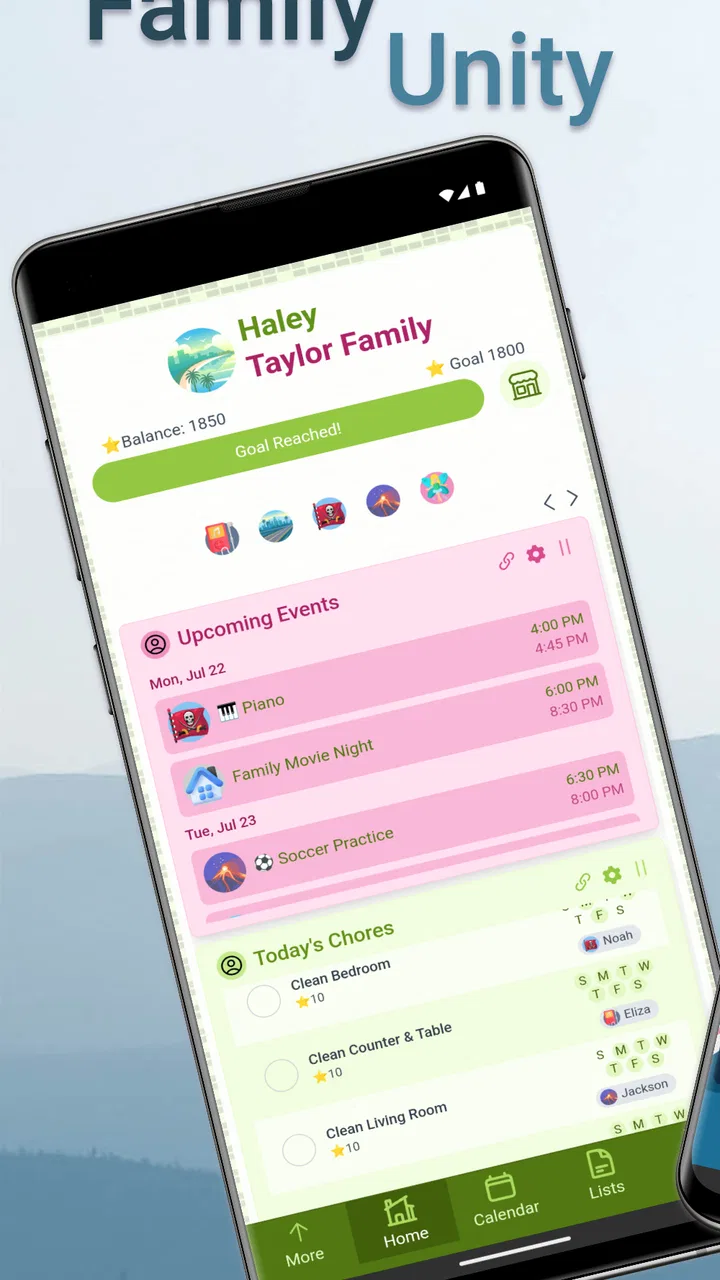
Family Tools: Family Organizer is the kind of parenting app I would try when family life starts feeling less like a shared routine and more like a stream of messages, reminders, and last-minute questions. It brings chores, homework, calendar events, and meals into one family-focused space, which sounds simple, but that combination matters. Parents often use one tool for appointments, another for school tasks, and a chat thread for dinner plans. The result is that everyone may have the information, yet nobody is looking in the same place.
After spending time with it, I see the app as a lightweight coordination hub rather than a complete replacement for every calendar, task manager, or messaging service. Its appeal is strongest when several people need to contribute to the same household routine. The experience also depends heavily on how consistently the family checks and updates shared information, especially when members are moving between home, school, work, and activities.
Created by Zerin Technologies, this free parenting app is rated for Everyone and runs on Android devices using at least version 10 of the operating system. It has reached over ten thousand installs, with an average rating of 4.2 from around one hundred sixty ratings and forty-eight written reviews. The current version is 3.6.0, and optional in-app purchases range from $2.49 to $24.99 per item.
You May Also Like

 Blood Strike: 2.5 Anniversary
Blood Strike’s Loadouts Turn Every Drop Into a Tactical Gamble
A close look at Blood Strike’s custom loadouts: how fast access to signature weapons reshapes its battle royale rhythm, rewards preparation, and narrows the gap between fights.

 Pandora - Music & Podcasts
Pandora’s Music Is Easy to Start, but Harder to Recover
Pandora’s strength is its low-effort path from a seed to a station. Its weak spot is how much confidence it asks you to place in connection, setup, and quiet recovery.

 8 Ball Pool
 Is Built on Rivalries, Rematches, and Routine
A close look at the rivalries, rematches, shared routines, and unanswered safety questions that turn a quick pool match into a persistent mobile community.

 Samsung Music
’s Quiet Strength Is Playing What You Already Own
Its reach comes less from spectacle than from dependable access to a personal library. That simplicity is both the app’s strongest retention engine and its ceiling.

 AccuWeather: Weather Radar
AccuWeather Review: A Quick, Clear Forecast for Everyday Decisions
For everyday plans, the best forecast is the one you can understand quickly. AccuWeather makes rain timing, radar, and local conditions easy to act on, with a few trade-offs.

 Hill Climb Racing
Why Hill Climb Racing Still Turns Crashes Into One More Run
A tiny car, a bumpy hill and one more upgrade: Hill Climb Racing keeps resurfacing because its simple chaos makes every near-miss feel personal.
More From Our News Desk
View All News


How Family Tools handles a connected family routine
I find the value of a connected family organizer becomes clearest when a plan has to pass from one person to another, not just sit in a calendar. In the next section, I look at how Family Tools can support that handoff across chores, schoolwork, meals, and events—and why a small, shared routine is usually more dependable than trying to record every detail.
A shared space is useful only when everyone actually checks it
The central idea is easy to understand: instead of keeping a chore list on the refrigerator, homework details in a school message, and meal planning in a private note, the family can organize those areas together. I like that the app is not limited to one narrow parenting task. A household can use it for repeating responsibilities, school-related planning, upcoming events, and food decisions without switching between several unrelated systems.
That breadth is also the first trade-off. A specialized calendar may offer deeper scheduling tools, while a dedicated task manager may be better for complex projects. Family Tools makes more sense when the goal is visibility and participation rather than advanced customization. I would recommend it to parents who want a common household view, not to somebody managing a large project with dependencies, detailed time tracking, or professional collaboration requirements.
The most important habit is deciding what belongs in the app before inviting everyone to use it. If every small thought becomes a task, the shared space can become noisy. I would keep chores for repeatable responsibilities, homework for school-related actions, calendar entries for events that affect several people, and meals for decisions the household needs to coordinate. That separation makes the app easier to scan on a busy morning.
Connectivity changes the timing of every update
Because the value comes from shared organization, connectivity is not just a technical detail. A parent may add a homework reminder while connected at work, another family member may check the plan from a mobile connection on the way home, and a child may need to see a change before starting an assignment. The usefulness of an update depends on it reaching the people who need it at the right moment.
I would avoid treating the app as a substitute for an urgent conversation. If dinner changes in the next few minutes or a child needs immediate pickup, a direct call or message is still more dependable as a communication method. Family Tools is better for making the plan visible and reducing repeated questions than for handling emergencies.
This distinction is easy to miss because a shared organizer feels authoritative once everyone starts relying on it. My practical rule would be simple: use the app for coordination, but use a direct channel when timing is critical. That approach prevents a delayed or missed update from becoming a safety or transportation problem.
A realistic weekday workflow
Imagine a weekday with two working parents and children following different schedules. One parent adds the evening activity to the calendar, another records a homework responsibility, and the family uses the meal area to settle what needs to be prepared. A chore can then be assigned as part of the evening routine rather than being mentioned repeatedly in conversation.
The advantage is not that the app magically completes the work. Its advantage is that the family can refer to one shared plan instead of reconstructing it from memory. A child can check what needs attention after school, while a parent can see whether the evening includes enough time for cooking, homework, and household tasks.
There is a useful planning insight here: meals can act as an anchor for the rest of the evening. If the family knows when food needs to be ready, chores and homework can be arranged around that point. This is more practical than treating meal planning as an isolated list, especially on days when activities make the usual routine impossible.
Using it from phones rather than from a desk
Family organization usually happens in fragments. I might remember a chore while standing in the kitchen, notice a school obligation while waiting for an appointment, or need to check dinner plans from a supermarket aisle. A mobile family organizer fits those moments better than a system that expects everyone to sit down at a computer and maintain a formal schedule.
Still, phone-based organization has a weakness: attention is divided. A parent may add an item quickly and forget to make it clear who it concerns. A child may glance at the app but miss a detail because the screen is being checked between activities. I would make entries short, specific, and easy to interpret without additional explanation.
For example, “finish science worksheet before dinner” is more useful than “science,” because the first version gives the family a time relationship. Similarly, a chore should identify the action plainly instead of relying on a private family shorthand that only one person understands. The app can centralize information, but the family still has to write it well.
Where mobile connectivity helps most
The strongest mobile use case is a changing day. If an event moves, a meal needs adjusting, or a responsibility changes hands, a shared organizer can reduce the number of separate conversations required. That is especially helpful when parents are not in the same place and children are moving between school, home, and activities.
Connectivity also supports a more balanced division of work. When household responsibilities are visible to everyone, the planning burden does not have to remain in one parent’s head. I would use the app to make the invisible work of family management more visible: remembering appointments, coordinating food, noticing school deadlines, and keeping chores from being forgotten.
However, visibility can feel uncomfortable if the app is used as a surveillance tool. Children may respond poorly if every action becomes a monitored obligation. I think the better approach is to agree on a small set of shared responsibilities and explain why they are there. The organizer works best as a family agreement, not as a digital scoreboard used to criticize someone.
What happens when an update is missed?
Any connected organizer needs a recovery habit. If one person does not see a change, the family should know how to resolve that without assuming the app failed or blaming the person who missed it. I would establish a simple routine: check the shared plan at a predictable time, confirm important changes verbally, and use a direct message when a decision cannot wait.
This matters particularly for calendar events and meals. A missed chore may be inconvenient, but a missed pickup or a changed dinner arrangement can affect the whole evening. The app can organize the information, yet it cannot guarantee that every family member has opened the right screen at the right time. Treating the shared plan as the default reference, with a backup conversation for urgent changes, is the safer workflow.
Another practical recovery technique is to avoid deleting context too quickly. If a plan changes, write the new arrangement clearly rather than assuming everyone remembers the old one. A short note explaining the current decision can prevent the family from acting on an outdated expectation. This is one of those small habits that makes a shared organizer feel reliable even when daily plans are messy.
Keeping the system usable after a disrupted day
Families often abandon organization tools after a few missed updates. The answer is not to create more rules. I would do a short reset at the end of a difficult day: remove tasks that no longer matter, adjust the next meal, review the next event, and leave only responsibilities that still need action. This keeps the app from becoming a record of everything the family failed to do.
That reset also helps when connectivity has been inconsistent or when several people have made changes at different times. Rather than trying to reconstruct every edit, the family can agree on the current plan and make that version easy to understand. The goal is a clean starting point for the next day, not a perfect history of the previous one.
Being sensible about data and notifications
A family organizer naturally contains information that deserves care. Homework details, schedules, meals, and chores may seem ordinary individually, but together they can reveal a household’s routines. I would keep entries focused on what the family needs to coordinate and avoid placing unnecessary personal details into shared notes.
It is also worth deciding what should be visible to children and what should remain a parent-level planning matter. A family tool should support age-appropriate participation, but not every household detail needs to be exposed to every member. Clear boundaries make the shared space easier to trust.
Connectivity can encourage over-updating. If everyone receives a notification for every minor change, the app may become background noise and important items can be overlooked. I would group routine planning where possible and reserve urgent direct communication for genuinely time-sensitive matters. The best connected system is not the one that produces the most alerts; it is the one that helps people notice the right information.
Since the app is free to download but includes optional purchases priced from $2.49 to $24.99 per item, I would begin with the basic experience and only consider spending if the available paid options solve a specific household need. Families should judge purchases by whether they reduce friction, not simply because more organization sounds appealing. A free starting point makes that decision easier.
Who will appreciate it most?
I think Family Tools suits families that already communicate regularly but need a clearer shared structure. It can be particularly useful when several people contribute to chores, when homework is easy to forget, or when meals and appointments compete for attention. It is also a reasonable choice for parents who want children to participate in planning rather than receiving every instruction privately.
The app is less convincing for a single adult managing only personal tasks, a family that already has a well-maintained calendar and task system, or anyone who needs detailed project management. It may also frustrate households that do not agree on one central place for information. No organizer can solve the problem of people refusing to check it.
Compared with a paper chore chart, this approach is easier to adjust when plans change and more suitable for family members who are not standing in the same room. Compared with a general calendar, it puts household responsibilities, homework, and meals closer to the schedule. Compared with a family chat, it offers more structure and less scrolling. The trade-off is that it requires consistent upkeep and may not match the depth of a specialized tool.
My connectivity verdict
My overall impression is positive, with realistic expectations. Family Tools: Family Organizer is most valuable as a shared reference point for ordinary family coordination. It can reduce repeated questions, make responsibilities more visible, and help connect the practical pieces of a day. Its success depends less on advanced features than on whether the family agrees to use it consistently and writes updates clearly.
I would recommend trying it when the household’s main problem is scattered information rather than a lack of communication. Start with one calendar routine, a small number of chores, and the next few meals. Give everyone a reason to check the app, then adjust the system after seeing where updates are missed. That gradual approach is more sustainable than attempting to document the entire family life at once.
The key lesson is that Family Tools organizes shared decisions, but it does not replace family communication. When the connection is available and everyone treats the app as a common reference, it can make a busy routine calmer. When a change is urgent, a phone call or direct message remains the better choice. For families comfortable with that balance, Zerin Technologies’ parenting app is a practical free starting point, while users seeking deep scheduling controls or a fully specialized task system may be happier with another category of tool.
FAQs for Family Tools: Family Organizer
01What is Family Tools: Family Organizer used for?
Family Tools: Family Organizer is designed to help households coordinate everyday responsibilities in one shared space. After reviewing its main features, the app is most useful for managing family schedules, appointments, tasks, reminders, shopping plans, and other household information. It can reduce the need for scattered messages and paper notes, especially when several family members need access to the same plans.
02Can multiple family members use Family Tools: Family Organizer together?
Yes, the app is intended for shared family organization rather than individual planning only. You can typically create or join a family group and coordinate information with other members, depending on the permissions and account options available in the current version. Before downloading, check whether the features you need, such as shared calendars, assigned tasks, or synchronized lists, are included in the free plan.
03Is Family Tools: Family Organizer free to download and use?
Family Tools: Family Organizer may be available to download without an upfront charge, but some functions can depend on subscriptions, in-app purchases, advertising, or account limitations. The exact pricing and included tools may vary by platform and change over time. I recommend checking the app store listing carefully before subscribing, particularly if you want unlimited family members, advanced planning features, or an ad-free experience.
04Does Family Tools: Family Organizer work on both Android and iPhone?
The availability of Family Tools: Family Organizer depends on the official release provided by its developer. If versions exist for both Android and iOS, family members using different devices may be able to participate, although certain features or interface details can differ between platforms. Check the Google Play Store or Apple App Store listing for compatible operating-system versions and device requirements before installing.
05Is Family Tools: Family Organizer safe for storing family information?
Because the app can involve schedules, contact details, tasks, locations, or other household information, privacy should be considered before creating a shared family account. Review the developer’s privacy policy, requested permissions, data-sharing practices, and account-security options. Avoid entering highly sensitive information unless you understand how it is protected, who can access it, and whether your data can be deleted.
Pros
- Shared calendars make it easier to coordinate school
- work
- and family events.
- Task lists help distribute chores and keep household responsibilities visible.
- Family members can access important information from one central place.
- Useful reminders can reduce missed appointments and everyday errands.
- The interface is practical for managing busy household routines.
Cons
- Some features may require a subscription or in-app purchases.
- All family members may need accounts to use the app effectively.
- Too many notifications can become distracting for larger households.
- Setup takes time if you want to add schedules
- tasks
- and family details.
- Privacy-conscious users may hesitate to store household information in the app.

Family Tools: Family Organizer
Gallery